
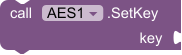
SetKey
MethodSet the AES key (must be 16, 24, or 32 bytes).
| Parameter | Type |
|---|---|
| key | text |

Encrypt and decrypt strings with AES GCM/CBC support and automatic key utilities.
AES Encryption Extension provides production-ready encryption tools for App Inventor apps. Manage secure keys with auto-generation, configure IVs, and perform AES encryption/decryption using modern modes like GCM—all from intuitive blocks designed for secure data workflows.
AES encrypt and decrypt strings. Set a 16/24/32-byte key (and IV for CBC/GCM) before EncryptData / DecryptData, or generate a random key.
Set the AES key (must be 16, 24, or 32 bytes).
| Parameter | Type |
|---|---|
| key | text |
Generate a random AES key of the specified length (16, 24, or 32 bytes).
| Parameter | Type |
|---|---|
| length | number |
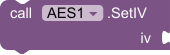
Set the IV key (must be 16 bytes for CBC and GCM).
| Parameter | Type |
|---|---|
| iv | text |
Encrypt the input data.
| Parameter | Type | Notes |
|---|---|---|
| plainText | text | String to encrypt. |
Decrypt the input data.
| Parameter | Type | Notes |
|---|---|---|
| cipherText | text | Encrypted string to decrypt. |



 MIT App Inventor
 Kodular
 Niotron
 Android Builder
 Thunkable
$7.99
Read one incoming OTP SMS with Google's SMS Retriever API. No SMS permission and no inbox access.
$7.99
Shrink a PDF on the device by re-encoding pages. No internet and no file upload.
$7.99
Send OneSignal push notifications, and receive them on this device.
$7.99
Firebase Cloud Messaging push notifications: device tokens, topics, tray notifications, tap handling, and optional HTTP v1 sending.