
ImageChanged
EventFired when the picture on screen changes. index starts at 1.
| Parameter | Type |
|---|---|
| index | number |
| path | text |
| count | number |

Swipe through pictures from a list or a folder. Long-press a picture to delete it.
ImageSlider is a visible gallery. Drop it on the screen, then pass the file paths you already keep in a list, or point LoadFolder at a Pictures directory. Swipe, or call Next and Previous. The counter can read 2 / 5 or Bild {index} von {count}. LongClick gives you the picture so DeleteImage can remove it from the slider and delete the file when the app is allowed to. Web links are rejected. Camera files, image-picker content URIs, and assets stay on the device. There is no INTERNET permission. Android 5.0 (API 21) or newer. Reading a shared Pictures folder on Android 13+ asks for photo access.
Swipe through pictures from a list or a folder. Long-press a picture, then call DeleteImage. Paths stay on the device. Web links are rejected.
Drop a VerticalArrangement, set its height, then drag ImageSlider under the screen (it is not visible). Call Initialize with that arrangement, then set Images to your list.
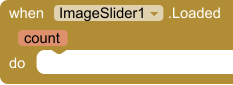
Screen.Initialize sets ImageSlider.Images to the list of paths. Loaded fires with the count. ImageChanged fires with the picture now on screen. Swipe left or right, or call Next and Previous. The counter uses CounterFormat.
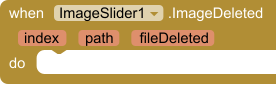
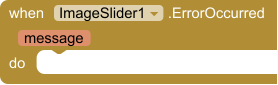
LongClick receives the index and the path. DeleteImage removes that picture and tries to delete the file. ImageDeleted fires, and the blocks save ImageSlider.Images back into the list. ErrorOccurred shows a notifier when a path cannot be read.
Fired when the picture on screen changes. index starts at 1.
| Parameter | Type |
|---|---|
| index | number |
| path | text |
| count | number |
Fired when the picture is tapped. index starts at 1.
| Parameter | Type |
|---|---|
| index | number |
| path | text |
Fired when the picture is held down. Call DeleteImage with index to remove it. index starts at 1.
| Parameter | Type |
|---|---|
| index | number |
| path | text |
Fired after DeleteImage. fileDeleted is true only when the file was removed from the device. The picture is already gone from the slider.
| Parameter | Type |
|---|---|
| index | number |
| path | text |
| fileDeleted | boolean |
Fired after Images or LoadFolder replaces the list, including when the list is empty.
| Parameter | Type |
|---|---|
| count | number |
Fired when a picture or folder cannot be read, or an index is out of range.
| Parameter | Type |
|---|---|
| message | text |
























 MIT App Inventor
 Kodular
 Niotron
 Android Builder
 Thunkable
Free
Access 1500+ Google Fonts in your AI2 apps with ease. Download, apply, and customize fonts directly.
$7.99
Capture photos and videos with real-time filters, overlays, and smooth transitions.
Free
Generate unique DiceBear avatars as SVG or JPEG for every user without API costs.
Free
Generate full-resolution YouTube thumbnails from any video ID in one block call.